CRM systems: what they are and how they help your business
CRM connects customer information, enquiries, sales progress and next actions. This guide explains how it works, how it differs from ERP and how to choose a suitable solution. Inovotec develops custom CRM software around agreed business workflows.
Who owns the enquiry, what did we promise and when do we follow up? The team should find these answers in one workspace.
Prepared by Inovotec · Updated
What is a CRM system?
A CRM system is customer relationship management software that brings together contacts, interaction history, enquiries, sales opportunities and planned actions. CRM stands for Customer Relationship Management. The system helps the team know who works with each customer, which stage a sale has reached and what needs to happen next.
CRM also refers to the practice of managing customer relationships. Software supports that practice, while people must agree working rules: who responds, when a lead is qualified and how an outcome is recorded. Choosing CRM therefore starts with your process rather than the longest feature list.
A contact list tells you who the customer is. CRM also shows what was discussed, what was offered, who is responsible and when to contact them again.
How CRM works: from enquiry to order
Suppose a B2B company receives an enquiry about equipment and installation. CRM needs to capture a clear workflow as well as a phone number. The example below shows actions that can connect within one system; the actual stages are adapted to your sales process.
01
Enquiry and ownership
A website form creates an enquiry. Source, requested service and contact are stored, with duplicates checked. Agreed rules assign a salesperson and a response deadline.
02
Requirements and quotation
The salesperson clarifies requirements, budget and timing. A suitable enquiry becomes an opportunity. Quote versions, documents and decision-making contacts are linked to that opportunity.
03
Negotiation and next action
The quote has a next action and a due date. If there is no reply, the system can remind the salesperson. Changed terms create a new version so the team can identify the current quotation.
04
Outcome and handover
A won deal can become an ERP order or a delivery project. A lost deal records a reason. The service team receives agreed commitments, contacts and the relevant history.
Exceptions matter too: a repeat enquiry from the same customer, an absent salesperson, multiple decision makers or a cancelled quotation. These are reviewed before development. An enquiry should not automatically count as a qualified deal, and a won deal should not automatically count as collected revenue.
Core CRM system features
CRM scope depends on team workflows. Sales CRM focuses on leads and deals, while a service company may also need tasks, time records or service history. These modules can be designed separately so the first release addresses a clear need.
Accounts and contacts
An account stores company details, an owner, related people and relationship history. One company can have several contacts and opportunities. Customer status and deal stage describe different things and should not be combined into one field.
Lead and opportunity management
Capture lead source, requirements, value and response deadline. The pipeline uses stages and transition rules suited to your process. Managers can filter opportunities by salesperson, period or service and identify deals with no planned next action.
Tasks and interaction history
Calls, meetings, notes and commitments link to the account and opportunity. Each task has an owner and deadline. Email or calendar synchronisation is designed separately around the tool’s API, permissions and agreed data scope.
Quotations and documents
Generate quotations from templates and track versions and approvals. Pricing or discounts may require manager approval. Invoicing, contracts and electronic signature functions are scoped when needed; attaching a document does not by itself create an accounting integration.
Customer service
After a sale, service requests can have a priority and an assigned specialist. Account history helps work continue when staff change. Not every CRM needs a service module; its scope depends on your contracts and operating model.
Reports and customer segments
Track lead sources, stage duration, deal outcomes and repeat orders. Segment customers by activity or selected attributes. A marketing integration should also carry communication permission status so opted-out recipients are not added back to an active list.
How does CRM benefit a business and how can you measure it?
Practical CRM benefits come from timely actions and reliable data entry. The system can help reduce missed enquiries, keep work moving when staff change and reveal sales bottlenecks. Assess results using indicators that reflect your process.
Problem, CRM action and a measurable indicator
Problem
What CRM organises
What to measure
Enquiries go unanswered
Owner, response deadline and overdue-task list.
First-response time; number of unanswered enquiries.
Quotations are forgotten
A next action and reminder for every active opportunity.
Opportunities without a next action; time in stage.
Useful channels are unclear
Lead source connects to the final deal outcome.
Won-deal share and value by source.
Only one employee knows the account
Shared contacts, commitments and tasks with controlled access.
Handover gaps; unresolved service requests.
For conversion reporting, first agree what qualifies as an opportunity and which period receives the outcome. Call counts or newly created contacts alone do not show sales quality. When comparing periods, account for lead sources and seasonality.
Illustrative time calculation: if four employees each save ten minutes of information searching per day over twenty working days, that totals about 13.3 hours. This is an example, not an Inovotec customer result. Include time spent updating and maintaining CRM in your own assessment.
When does a business need CRM?
Consider CRM when information is scattered across emails, spreadsheets and employees’ memories and the next action becomes unclear. This can happen in a small company too. Recurring workflow problems indicate the need more reliably than employee or customer counts.
B2B sales: multiple account contacts, longer negotiations, quote versions and handover to delivery.
Service businesses: repeat orders, planned work and customer-specific service history.
Growing teams: lead assignment, staff cover and shared working rules.
If you work alone with few contacts and existing tools provide clear deadlines and history, a large CRM may be unnecessary. Start with a well-maintained spreadsheet or a small standard solution and expand when a specific need appears.
CRM, ERP and Excel: how do they differ?
Different purposes of business tools
Tool
Primary purpose
Question it answers
CRM
Relationships, enquiries, opportunities and service.
Who needs a reply, who is negotiating and what happens next?
ERP
Order fulfilment, stock, purchasing, production and selected financial processes.
Can we fulfil the order, when and with which resources?
Excel
Spreadsheets with manually agreed data and work practices.
How do we record and compare a limited amount of data?
CRM and ERP features can overlap. Agree where master customer records live, when an opportunity becomes an order and which system updates fulfilment status. Excel may be enough for a simple list, but ownership, reminders and interaction history usually need additional working practices.
The best choice depends on workflow, budget and support capacity. A standard platform may offer extensive features and configuration. Custom software deserves consideration when a critical process or integration needs specific logic that becomes awkward or expensive to implement on an existing platform.
CRM selection criteria
Criterion
Standard solution
Custom development
Workflow
Suitable when existing features, configuration or extensions cover the required process.
Suitable when essential rules, interfaces or integrations need custom logic.
Launch
Ready-made features can accelerate launch; data preparation and training are still needed.
Features are designed and built in stages. The first release needs a clear scope.
Total cost
Assess licences, users, add-ons, implementation and integrations.
Assess development, hosting, support, external tool fees and future changes.
Data and continuity
Check export options, API limits and contract exit terms.
Agree handover terms for data, source code, documentation and support.
What should you check before choosing?
Test a real scenario: enquiry, qualification, quotation, reminder and handover to another employee.
Check permissions: what salespeople, managers and service staff can see and who can export customer data.
List existing systems and the exact data that must move between them.
Request a trial import and assess attachments, historical records and duplicate handling.
Compare total costs over several years, including additional users, support and changes.
Agree data export, support procedures and handover terms before signing.
CRM integrations: website, email, ERP and accounting
An integration is useful when it removes a specific re-entry step. A website form can register a lead, a calendar connection can coordinate meetings and a CRM–ERP link can pass an approved order. Agreed fulfilment or payment statuses can also be returned to CRM.
Before development, check available APIs, fields, data direction and access permissions. Define behaviour for connection failures or repeated messages. An error log and a responsible person help prevent unnoticed missing enquiries. Automatically reading every email is not a default feature of every CRM.
Start with clear rules: route enquiries, remind staff about deadlines, create a task when a stage changes or request approval for a larger discount. Define triggers and exceptions for each action. A staff reminder and an automatic customer email have different consequences and need separate workflow decisions.
An AI module can help draft a conversation summary, suggest an enquiry category or prepare a reply draft. These features are scoped separately. Plan human review before customer communication or important record changes and agree the information and access provided to an external AI service in advance.
CRM implementation and data migration
Implementation must confirm that the team can complete its everyday work, as well as provide working screens. Inovotec projects follow agreed stages. Timeline and first-release features are quoted after reviewing processes, data and integrations.
01 · Requirements analysis
Document the current workflow and one primary desired outcome. Collect real enquiries, quotations and exceptions. Agree who will make process decisions.
02 · Structure and prototype
Plan account data, sales stages, roles and key screens. Sales staff try everyday actions before the complete system is built.
03 · Development and integrations
Build the agreed first release, connect required systems and check failure scenarios. Define which system owns each data field.
04 · Data migration
Map fields, resolve duplicates and perform a trial import. Check record counts, Lithuanian characters, contact relationships and sample account histories.
05 · User testing and training
The team tests the full enquiry-to-outcome flow, permissions and phone use. Training uses your examples. Assign a person to help maintain data quality.
06 · Launch and support
Agree final import timing, backups, support procedures and a rollback plan. After launch, review agreed indicators and decide which additional module is actually needed.
Keep the original export and decide which data is still needed before migration. Email attachments, notes and contact relationships do not always fit in one CSV file. A trial import helps reveal these issues before the team switches systems.
How much does a CRM system cost?
CRM cost follows the agreed scope. Account records and tasks are a different project from multiple sales workflows, migration and several system integrations. When comparing quotations, check whether analysis, user testing, training, migration and launch work are included.
Custom CRM projects from €3,000
This is Inovotec’s starting price for a smaller-scope project. The quotation defines modules, integrations, timeline and final cost. The standard development rate is €60/hour. Hosting, support and future development terms are agreed separately.
A standard platform may charge for users, modules or add-ons. Custom CRM also needs infrastructure and support, and connected external services may have their own fees. A complete budget covers development or implementation, migration, operation, support and planned changes.
A practical Inovotec example: INOVS customer management
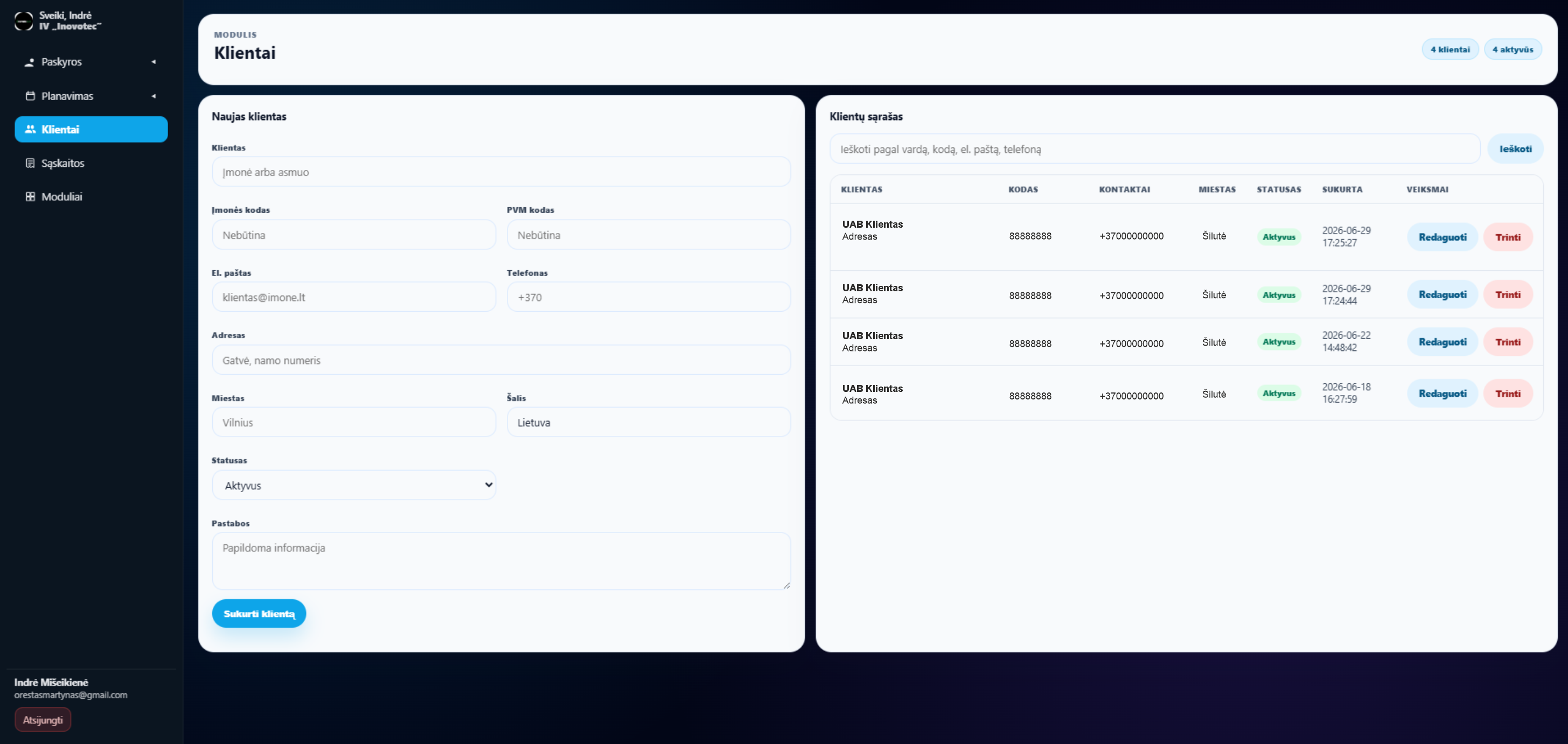
INOVS is a modular business system presented by Inovotec, with customer management, a planning calendar, time records and invoice generation from tasks. Below is an actual customer-module screen showing company details, contacts, city, status and actions.
INOVS customer module from the public system presentation. Sales pipeline, quotations and automation for a custom CRM project are scoped separately around your requirements.Explore INOVS modules and additional screens →
Frequently asked questions about CRM systems
What does CRM mean and what is CRM software?
CRM stands for Customer Relationship Management. CRM software helps teams store customer information and track enquiries, commitments and sales actions. CRM also includes working practices: responsibilities, data entry and communication with customers.
Does a small business need CRM?
Yes, if existing tools struggle to manage enquiries and team work. Missed actions and scattered information matter more than a specific employee count. A small team may be served by standard CRM software or a small custom module.
How does CRM differ from ERP?
CRM primarily manages relationships, sales and service. ERP connects order fulfilment, stock, purchasing and other business processes. Features can overlap: CRM may be an ERP module or a separate integrated system.
Is custom CRM always better than standard software?
No. Standard software often suits common sales workflows. Consider custom development when important rules or integrations are awkward to implement on an existing platform. Test your actual work scenarios and compare total costs before choosing.
How much does a custom CRM system cost?
Smaller-scope Inovotec CRM projects may start from €3,000. The final quote depends on modules, integrations, migration, permissions and testing. Hosting, support and external services are agreed separately; the starting price does not include every feature described on this page.
How long does CRM implementation take?
Timing depends on scope, data quality and integrations and is quoted after requirements review. Allow for team testing, migration and training alongside development. A clear first release can help the team start using the system sooner.
Can data be migrated from Excel or another CRM?
Usually, if data can be exported in an agreed format or accessed through an API. Attachments, emails and historical relationships need separate assessment. A trial import confirms the fields and records included before the final transfer.
Can CRM connect to email, a website and accounting software?
Yes, when the systems provide suitable interfaces and the necessary access. A website form can create a lead and a won deal can create an order elsewhere. Agree integration scope, data direction and error handling before development.
Will CRM work on a phone and offline?
A browser-based CRM can be adapted to phone screens. Camera access, notifications and offline work are not automatic features and need separate design and testing. A mobile app is considered around staff locations and the actions they need.
Can CRM be developed in stages?
Yes. Start with accounts, enquiries, pipeline stages and tasks, then add documents, reporting or integrations. Agree core data relationships from the beginning so later modules can use existing information.
Will CRM automatically increase sales?
Installation alone does not ensure higher sales. CRM helps teams act on time and see the process, but lead quality, the offer and team work still matter. Assess benefits using indicators chosen before implementation rather than contact counts alone.
Who maintains the system and how can data be exported?
Support, updates, backups and assistance are agreed for the project. Discuss data export and handover in advance. Customer-data access follows roles; critical changes and their audit history are designed to the agreed requirements.
Tell us where enquiries come from, how many people handle them and which stage causes problems. Include your existing tools and one real workflow example. We will assess the need for custom software and propose a clear first-release scope.
Describe the situation in a few sentences. We will assess what is worth automating, whether a custom system makes sense, and what the next step could be.
ERP, WMS, production, logistics and integrations
01Process
02Analysis
03Solution
04System
A solution tailored to the way you work
Quick assessment
Send the situation — not a long brief
Three fields are enough to start the conversation.
✓ Request receivedWe have the context. We will review it and get back to you.
InovotecMessage us
Hello! 👋
Briefly tell us what kind of solution you are looking for.