An ERP system connects orders, inventory, production and documents so teams can follow the same workflow across the business. Explore how to compare ERP options and what to assess before implementation. Inovotec develops custom ERP systems and integrations around the way your company works.
Sales sees the order deadline, the warehouse sees reserved stock, production sees the work required and management tracks progress. Each team works with the relevant data from the same order.
Prepared by Inovotec · Updated
What is an ERP system, and what does it manage?
ERP stands for Enterprise Resource Planning. It is business management software that connects selected processes and their data, helping teams plan resources, manage orders and track operations across departments.
The scope of an ERP system depends on how a business operates. One company may focus on purchasing and inventory; another may need production, work planning or project costing. Each module supports a particular business area and exchanges data with other parts of the system. When comparing options, consider which workflows need to connect, which integrations are required and whether a standard solution or a custom ERP system is the better fit.
ERP value comes from the relationships between tasks. A sales order can reserve stock, create a material requirement, assign work and link dispatch documents. A shared system or coordinated integrations help maintain common identifiers and a clear origin for information.
How does ERP work in practice?
A user enters information or it arrives from another application. The system checks required fields and applies agreed rules: who may approve an order, when stock is reserved and which document is created. Other teams receive their tasks, and status history shows who acted and when.
With several applications, assign an authoritative source for each type of data. ERP may own item codes while accounting software owns financial records. Updates can happen immediately, periodically or after approval, depending on the integration. The interface should distinguish current information from pending updates.
Example: 20 items ordered, 12 available
Suppose a customer orders 20 units and 12 are available to promise. Under an agreed workflow, ERP reserves those 12 and identifies a requirement for 8 more. The shortage is purchased or manufactured, and delivery is confirmed after checking supply and operations. This illustrative scenario depends on rules defined during system design.
01
Order
20 units required, with the customer and agreed deadline in one record.
02
Reservation
12 available units are reserved; 8 still need purchasing or production.
03
Fulfilment
Responsible staff receive purchasing, production or picking tasks.
04
Documents
Dispatch is recorded and agreed invoice data is transferred.
Core ERP features and modules
Choose modules around the actual workflow. If stock shortages are the main problem, a customer database alone will not solve it: orders, reservations and purchasing need to connect. Inovotec can develop selected modules or integrate existing applications. Scope is agreed before work starts.
Sales and orders
Customer enquiries, quote versions, prices, order lines and fulfilment status connect to stock and operations. Sales staff can see whether an item is available, reserved, on order or in production. Approval rules distinguish a quotation from a commitment to the customer.
A material shortage can become a purchasing requirement, checked against supplier lead times, minimum quantities and existing orders. Goods receipt checks quantities and documents. The workflow must define who approves a purchase and how partial deliveries are handled.
Warehouse and inventory
Goods receipts, transfers, reservations, issues and stock counts are recorded. Depending on the business, locations, batches, serial numbers, barcodes and RFID may be included. Physical stock and available-to-promise quantities are separated to avoid allocating one item to several customers.
Production orders connect to material requirements, operations, work centres and deadlines. Completed quantities, time, scrap and actual consumption can be recorded. Cost calculation depends on the agreed method and is designed with the people responsible for it.
Invoice data, purchases, sales and document history can be passed to existing accounting software. Financial accounting is not automatically part of every ERP. Implementation defines where accounting records are maintained, who checks documents and how discrepancies are reconciled.
Tasks, responsibilities, time and costs can be assigned to a customer or project. Managers see deadlines, stock requirements, workload and agreed indicators. A report is useful when its source records are clear and it supports a specific decision.
How does ERP differ from CRM, WMS and accounting software?
Functions can overlap. A product name alone does not define its capabilities: check the actual modules and integrations. ERP can include CRM and warehouse features or work alongside separate applications.
Which question does each system address?
System
Main purpose
Practical question
ERP
Connect processes and resources across departments.
How will an order affect stock, production deadlines and documents?
CRM
Manage customer relationships, enquiries and sales.
Who needs a reply, which quote should be sent and when should sales follow up?
WMS
Manage warehouse operations and item locations.
Where is the item and what needs receiving, picking or dispatching?
Accounting software
Maintain financial accounting records and reports.
How should a document, payment or transaction be recorded?
When does a business need ERP?
Repeated operational friction is a useful signal. If a simple decision requires calling three colleagues or reconciling several spreadsheet versions, review how information moves. Start with a workflow where current time and errors can be measured.
Orders are entered into several tools and changes do not reach everyone.
Stock is recorded, but reservations and their related orders are unclear.
Production deadlines are promised without checking materials or work-centre capacity.
Cost calculations and management reports require collecting data manually each time.
Manufacturers often need orders, materials and operations to connect. Trading companies need purchasing, reservations and sales to align. Logistics depends on shipments, documents and costs. Service businesses need time linked to customers and invoices. These differences determine which modules should come first.
Cloud ERP, an on-site server or a hybrid model?
Hosting location and software type are separate choices. Custom software can run on a remote server, while a packaged product’s deployment options depend on its vendor. A browser interface does not automatically imply a cloud subscription or offline operation.
Deployment model and responsibilities
Model
How it works
What to agree before deployment
Cloud / remote server
Staff connect over the internet; an agreed provider maintains the infrastructure.
Server location, data export, backups, access protection, connectivity and exit terms.
On company infrastructure
The system runs on a server controlled by the company. Remote access can be arranged separately.
Who maintains the server, installs updates, verifies backups and restores service after equipment failure.
Hybrid model
Part of the solution runs locally and part remotely, with data exchanged between them.
Synchronisation, error handling and what continues working if one connection is interrupted.
Security depends on more than server location. Plan permissions, access protection, updates, backups and verified restoration. Contracts should define data export and the steps involved in changing providers.
Packaged or custom ERP: how do you choose?
First test one real order and several exceptions. Check whether the solution supports your essential rules. Packaged ERP can be appropriate when the necessary features already exist. Custom ERP is worth considering when critical workflows or integrations require custom logic.
Evaluate against your workflow
Criterion
Packaged ERP
Custom ERP
Workflows
Suitable when existing modules and configuration cover the core workflows.
Suitable when essential workflows, rules or integrations require custom logic.
Initial implementation
Ready-made features can accelerate the start; configuration, migration and training are still needed.
Required features are defined and built first; delivery can start with one workflow.
Costs and support
Assess licences, users, modules, customisation and upgrades.
Assess development, infrastructure, support and future changes.
Data and handover
Check export, APIs, add-ons and contractual terms.
Define code rights, data export, documentation and handover in the contract.
Questions before choosing a supplier
Can the supplier demonstrate your complete workflow, including changes, partial deliveries and returns?
Where will customer, item and stock data be owned, and how will APIs and integration errors be handled?
What is included in the quote, and who owns migration, training, backups and support?
How can data be exported and maintenance handed over if your requirements change?
ERP integrations and data migration
An API integration defines more than connecting to another application. Agree which fields move, who owns item codes, when stock updates and how documents are reconciled. Retrying the same request should not create a second order or invoice. Errors must be logged and visible to the responsible person.
Migration starts with data quality: duplicate customers, item codes, units, opening stock and statuses. Trial a small import, reconcile a sample and agree the final migration date. Define historical document scope so staff know where to find older records.
Implementation includes workflows, data and staff readiness. A technical launch alone does not prove that an order can be fulfilled correctly. Inovotec plans milestones with verifiable outcomes: which action a user can complete and how delivery will be accepted.
Process analysis. Take a real order and trace it from enquiry to documents. Record bottlenecks, exceptions, responsibilities and existing software.
Scope and acceptance criteria. Choose the first-stage features and agree how they should work. Define an acceptance test, such as reserved goods no longer appearing as available.
Data and integrations. Clean customer and item codes, duplicates, units and starting states. Define APIs, data owners, update frequency and error logging.
Development and pilot. Configure or build features and test normal and exceptional cases. Check partial deliveries, order changes, returns and integration failures.
Training and launch. Train staff using their own tasks. Check permissions, opening balances, backups and responsible contacts. Agree when the new system becomes the working process.
Support and expansion. After launch, monitor agreed indicators and record defects and new requirements. Add another module when its value and relationship to the existing workflow are clear.
A common mistake: automating an undefined process
If staff disagree about when an order is approved or who owns a stock reservation, new software cannot resolve that ambiguity on its own. Agree the rules and responsibilities first, then implement them in the system.
ERP cost and how to assess value
ERP cost follows the actual scope. A module list is only the starting point: exceptions, permissions, reporting, integrations and migration matter too. Compare quotes against the same requirements so training or migration is not included in one price and left as additional work in another.
Projects from €4,500
Inovotec’s starting price for a smaller-scope custom project. The quotation defines scope, integrations, timeline and cost. Hosting, ongoing support and future development terms are agreed separately.
Include operating costs
Add infrastructure, backups, support, training and planned changes to development or licensing costs. Check how an additional user, module or API connection affects the total. Custom software also has maintenance costs, and the contract should explain how they are calculated.
Measure the work saved
Illustrative calculation: if 5 employees each stopped copying data for 15 minutes a day, over 20 working days that would release 25 hours. This is potential available time, not guaranteed profit or a payroll reduction. Validate the assumptions against your workflow and compare actual time before and after implementation.
You can also track order preparation time, corrected documents, stock-count discrepancies and overdue work. Choose a few indicators and their calculation rules before the project, then assess outcomes using your own records.
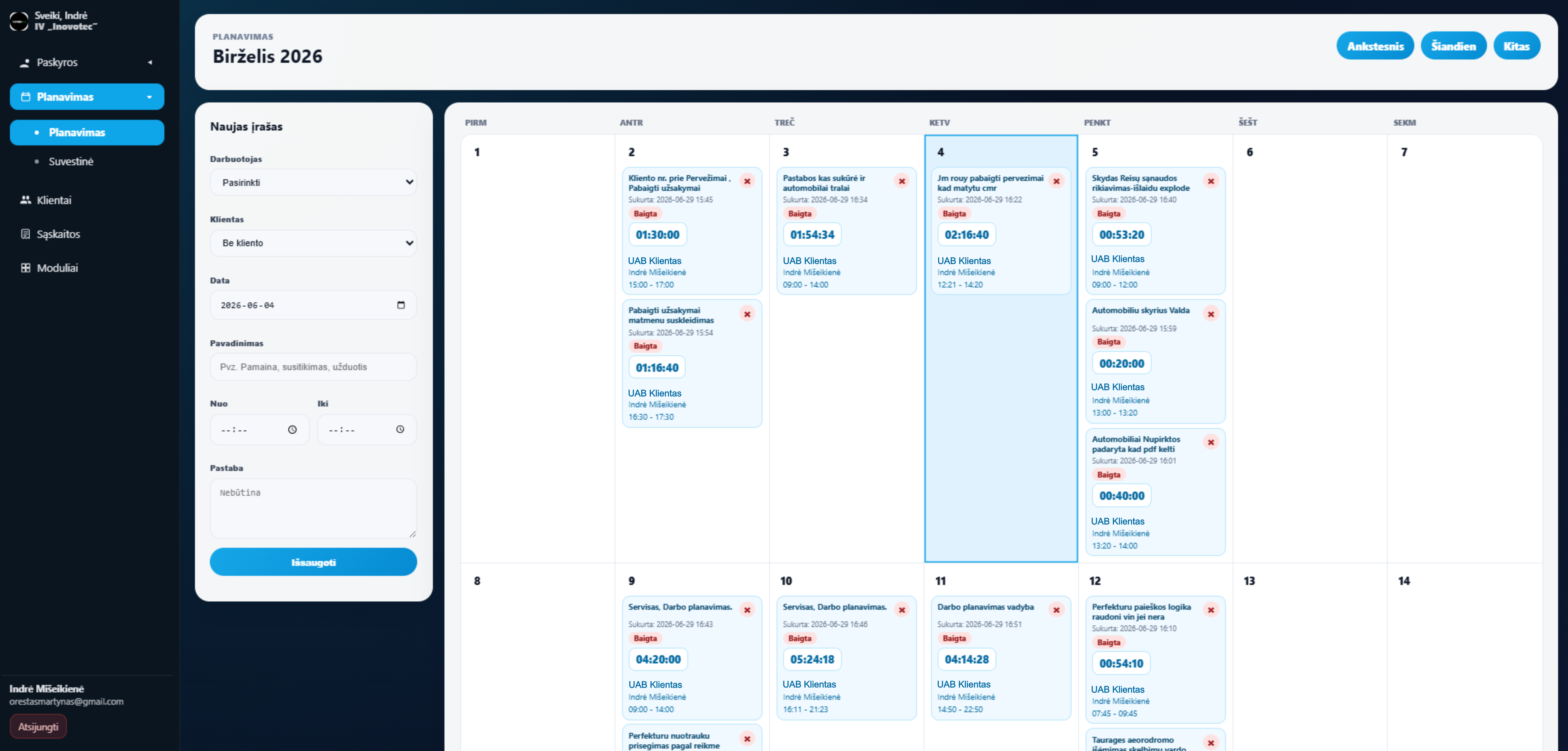
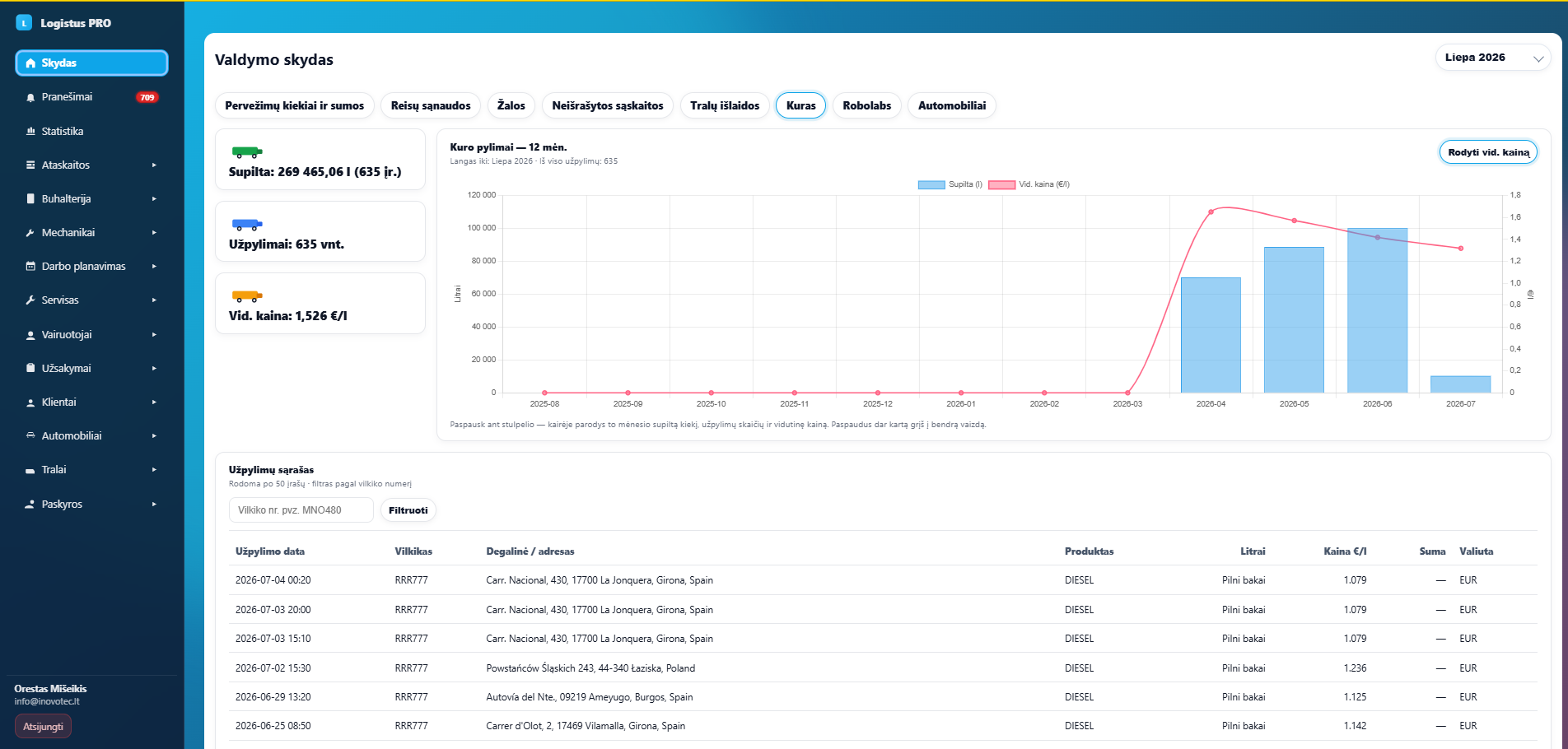
INOVS and Logistus PRO demonstrate specific workflows. Their modules and integrations help discuss how similar logic could fit your business. The screens below come from the public presentations of these systems.
INOVS: work scheduling calendar.
INOVS
User accounts, work scheduling, customers, time summaries and invoice generation. Completed work connects to the customer, rate and PDF document. This demonstrates one workflow spanning several business management modules.
Shipments, drivers, vehicles, documents, fuel and expense management. Its presentation shows connections with AS24, E100, RoboLabs and LocTracker. It illustrates how logistics records and integrations can be brought into one working environment.
ERP stands for Enterprise Resource Planning. An ERP system connects selected business processes and allows departments to work with consistent data.
Is ERP suitable for a small business?
Process complexity matters more than headcount alone. If a small team repeatedly copies orders, stock and documents, a focused integrated solution may help. If existing tools reliably cover the work, improving them may be sufficient.
How is ERP different from CRM and WMS?
CRM focuses on customers and sales, WMS on warehouse operations, and ERP connects a broader set of business processes. ERP can include these modules or integrate with separate CRM and WMS products.
Must ERP replace our accounting software?
Not necessarily. Accounting software can stay if it provides a suitable API or another exchange mechanism. Define which system owns the documents and how transfers are checked. Integration options are assessed before confirming the scope.
How much does custom ERP development cost?
Smaller-scope Inovotec projects may start from €4,500. This is a starting project price rather than a promise of every ERP module. The final quote depends on features, integrations, migration, permissions and testing. Infrastructure and support terms are agreed separately.
How long does ERP implementation take?
Timing depends on scope, integrations, data quality and staff availability for testing. A single-workflow project and a multi-department ERP need different plans. Before work starts, we agree milestones and identify the information and decisions needed from your team.
Can ERP work on a phone or tablet?
A web interface can be adapted to smaller screens. Warehouse terminals, barcode scanners and on-site workflows need separate assessment. Offline operation is not automatic in every web system and must be included in the agreed scope.
Can data be migrated from Excel?
Imports can be planned for customers, products, stock and other agreed records. Check codes, duplicates, dates, units and required fields before migration. Trial a small sample and reconcile the result against the source data.
Can ERP be introduced in stages?
Yes. The first stage can cover orders and stock, followed by production, documents or a customer portal. Agree common identifiers and relationships from the start so later modules can use the information already collected.
Who can access the data and who maintains the system?
Permissions are defined by roles and required actions. Agree backups, updates, support, data export and handover in the contract. Passwords alone are insufficient: access control and recovery procedures must be planned.
Related solutions and further reading
If you want to start with a specific workflow, explore customer management, warehouse, manufacturing and integration services.
Further explanation of the general ERP concept: Oracle: What is ERP? Specific capabilities and integrations are defined for your project.
Discuss what should connect in your business
Tell us how you record orders, where stock and production records live, which accounting software you use and where work repeats. We will assess existing tools, required integrations and the scope of a first stage.